Key access controls and acceptance criteria before outsourcing AI agent development

More companies want AI agents for support, sales docs, knowledge search, and project tracking. This article covers key points before outsourcing AI development: permissions, auth, approvals, audit logs, and acceptance criteria.
Contents
※Please be noted that this blog is translated automatically by AI
Summary
When outsourcing AI agent development, first separate what the AI can read, write, and execute, rather than focusing on model performance.
Mixing "read," "draft," "execute after approval," and "autonomous execution" in one scope makes safety verification difficult during acceptance.
Authentication, connections, user permissions, audit logs, and stop conditions should be client-side acceptance items, not left to vendors.
Excessive AI permissions risk not only incorrect answers, but also unauthorized updates, data leaks, and premature task execution.
Phinx integrates workflow, data, legacy systems, and AI-native development to support designing practical AI agents for your business.


First decision in AI outsourcing
When outsourcing AI agent development, do not start with which model to use.
Define the task, user, and execution scope first.
An agent merely searching internal docs differs vastly in permission and acceptance criteria from one logging into SaaS to update data.
For proposal support agents, access to past proposals, product data, CRM, and pricing is key.
For inquiry triage, access to FAQs, tickets, contracts, and approval workflows matters.
For accounting, risks vary greatly depending on whether it only reads systems or updates payment status.
Vendors can technically build many integrations.
However, without defined business boundaries, a great demo will fail to get production approval.
Before outsourcing, define the workflow, users, integrations, action scope, approver, and log custody.
Define Scope by Business Action, Not Deliverables
When outsourcing AI agents, defining scope by deliverables like "build a chat UI" makes acceptance testing weak.
Focus on what business actions the AI is responsible for.
For read-only: focus on preventing unauthorized data retrieval.
For drafting: review grounds, sources, and liability limits.
For execution after approval: verify who approves and if execution matches approval.
For autonomous run: define limits on budget, customers, data, schedule, and fail-safes.
Just asking to "automate work" without these boundaries lets vendors build UIs, but leaves you unable to judge acceptance.
Scope your AI agent project by business actions and authority levels, not feature lists.
Separate permissions by business use case
Certain tasks are easily automated with AI agents.
However, tasks suited for outsourcing differ from those where AI can hold strong authority.
Before ordering, classify each use case into "Read," "Draft," "Approved Action," or "Autonomous Action."
Use Case | Scope for Initial Phase | Key Acceptance Inspection Points |
|---|---|---|
First-line Inquiry Support | FAQ search & draft replies | Uses latest FAQs; human approves before sending |
Sales Material/Proposal Prep | Past document search & outline | Does not finalize client terms or pricing alone |
Internal Knowledge Search | Search rules & manuals | Does not include unauthorized documents in answers |
Billing/Accounting Check | Query billing status & spot gaps | Requires approval for updates or payments |
Project Progress Summary | Summarize tickets & spot risks | Limits scope of task changes and notifications |
What matters in this table is not the task name, but the level of authority.
In inquiry support, generating drafts is easy to start, but autosending risks errors or leaks.
In accounting, finding gaps is just support, while updating payments requires approval workflows.
Grant Strong Authority in Phases
Do not give strong authority to AI agents from the start.
It is safer to start with read-only, move to drafting, and then to human-approved execution.
This phased design lets you verify permissions, logs, and responsibilities step-by-step from PoC to production.
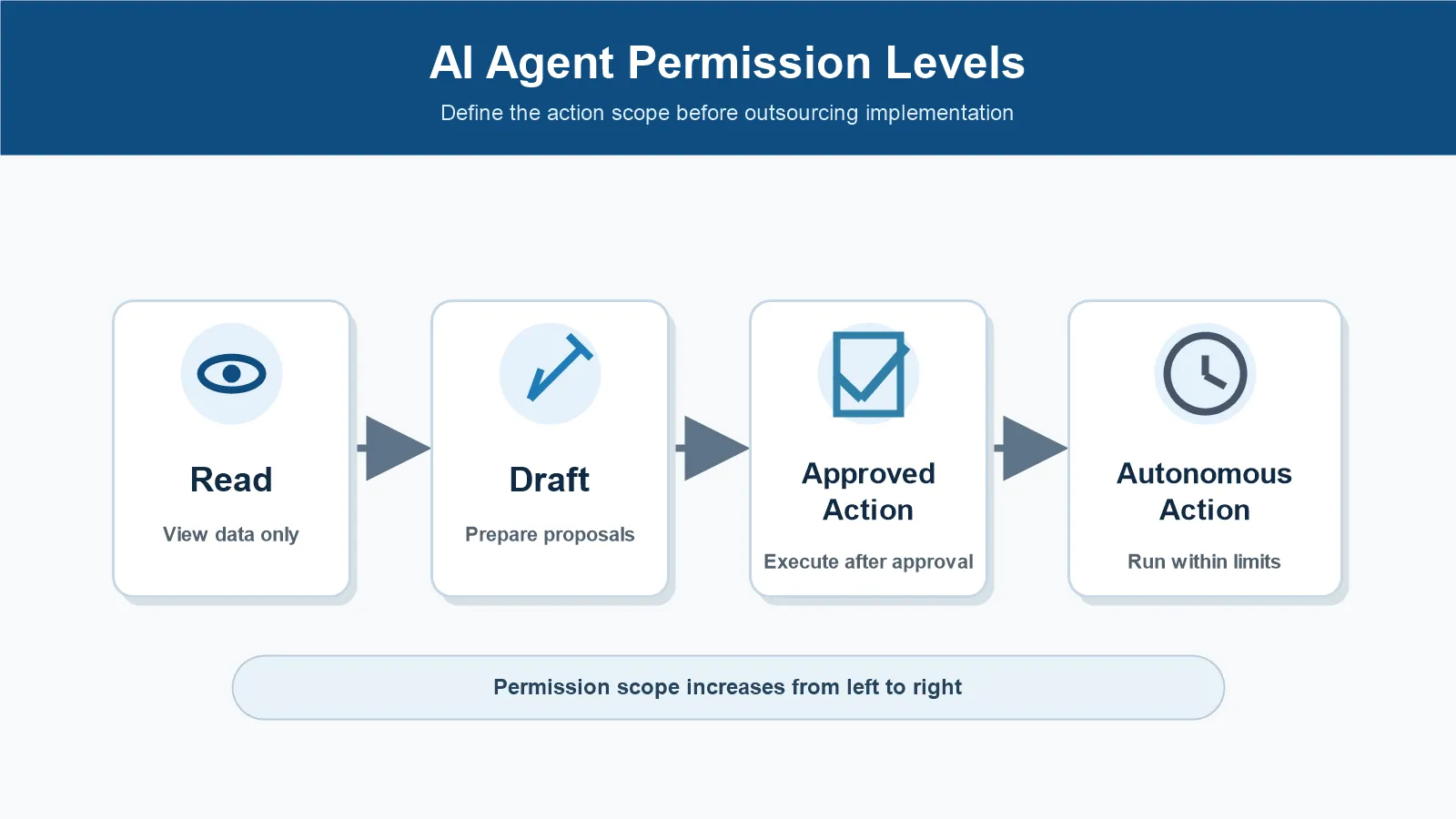
The figure shows the 4 levels of authority given to AI agents.
Authority increases from Read, Draft, Approved Action, to Autonomous Action.
Clients should decide the required level before consulting vendors on implementation.
Auth & Connection Scope Before Outsourcing
To make AI agents useful at work, they connect with internal docs, SaaS, databases, and APIs.
This requires authentication, authorization, and connection scope checks.
Without grasping this, clients only see "it worked" at inspection, missing "who had authority" and "how far they operated."
The July 28, 2026 Model Context Protocol spec updated MCP to include stateless core, header-based routing, and authorization hardening.
The MCP roadmap also focuses on agent identity and enterprise-ready security.
As AI agents connect to more external tools, designing permissions, auth, routing, and audits becomes vital.
Clients don't need to know deep technical specs.
However, you must be able to answer these questions before ordering:
Does the agent run on a personal or dedicated service account?
Does it inherit user permissions or use separate agent permissions?
Which SaaS, databases, APIs, and file storages will connect?
What is permitted: read, create, update, or delete?
How are customer, HR, contract, and financial data restricted?
Who approves permission changes or new connections?
Microsoft Learn shows how to secure an MCP server with Microsoft Entra ID: the client requests an access token for a resource, and the server validates it before running tools.
It also suggests using OAuth scopes or app roles to segment access per action.
Clients should ensure AI agent operations are authenticated and authorized like standard APIs, rather than worrying about implementation steps.
Create a Permission Matrix per Connection
Before outsourcing, a permission matrix makes verification easier.
List the SaaS name, purpose, data referenced, actions, auth method, approver, and log location.
This table helps secure agreements with internal IT and security teams, and the vendor.
Check Item | What Client Decides | Inspection Check |
|---|---|---|
Connection | SaaS, APIs, doc systems used | No unapproved connections |
Auth Method | Personal, service account, SSO | Traceable user authority |
Operation Scope | Read, create, update, delete | Unauthorized actions blocked |
Data Scope | Dept, customer, project, security level | No unauthorized data in responses |
Change Mgmt | Approver for new permissions/connections | Audit trail exists |
Without this matrix, clients only focus on "AI is useful."
Production issues arise not from utility, but from accessing unauthorized data or performing unapproved actions.
Approval Flows and Audit Logs in Acceptance
Acceptance testing for AI agents requires checking more than just answer accuracy.
Specifically, check approval flows and audit logs for write operations like sending emails, updating tickets/CRMs, changing billing statuses, sharing files, and sending notifications.
OpenAI's Workspace Agents for Enterprise and Business details using write action safety for risky workflows, and carefully handling write approvals for actions like sending, editing, posting, and deleting.
Additionally, Connector Action Constraints restrict what agents can ask connectors to do under specific conditions.
These concepts align closely with what clients should verify during acceptance testing.
Include the following test cases in your acceptance testing:
Do write actions like emails or CRM updates halt without proper approval?
Are the approver, approval time, approved content, and execution results logged?
Does the actual execution match the approved content?
Is access denied when attempting to view unauthorized customer, project, or department data?
Are incorrect, ambiguous, or dangerous prompts escalated to human review?
Are there set procedures for retry, halt, notification, or manual recovery upon failure?
Ultimately, AI agent acceptance testing is not about "getting the right answer," but verifying "if the AI operated within its authorized scope."
For clients, this serves as the basis for production deployment approval.
Logs must be readable and detailed
Simply saving audit logs is not enough.
You must be able to trace who input what, when, what the AI referenced, which tools were called, what action was taken, and the outcome.
Logging only the AI's final response is insufficient for troubleshooting.
In its May 20, 2026 security design document on MCP, the NSA highlights risks like dynamic tool invocation, implicit trust, and shared context.
This warning is crucial for clients.
When outsourcing AI agents, the more complex the system, the more important it is to keep logs, permissions, approvals, and shared contexts explainable.
Related articles
For enterprise AI success, you must define tasks, data, access, KPIs, and ownership before choosing tools. This article explains why AI adoptions fail and how to plan before starting a PoC.
Over-delegation failure patterns
AI agent risks go beyond errors.
The issue is what they can execute with their granted permissions when they fail.
Clients must anticipate potential failures and include them in acceptance testing.
A common failure is accessing unauthorized information.
For example, a general employee support bot summarizing performance reviews, candidate details, contract terms, or special pricing.
Even without showing original documents, AI summaries can cause data leaks.
Another risk is incorrect updates.
Errors in ticket status, CRM deals, billing status, or tasks impact downstream processes.
Unlike humans, AI agents processing in bulk can spread the same error widely.
Unauthorized execution is also critical.
Sending emails, creating share links, issuing purchase orders, or mass-mailing have external impact.
For these tasks, AI drafting should be separated from actual execution.
Treat Failures as Permission Design Issues, Not AI Going Rogue
AI agent incidents are often dismissed as "AI going rogue."
However, clients should evaluate permissions, not the AI's "personality."
Check for excess privileges, lack of approval steps, handling of vague inputs, and audit logs.
Even if an AI acts unexpectedly, read-only access limits the damage.
Required approval steps allow humans to intervene.
Autonomous execution with high privileges requires strict limits on budgets, scope, time, volume, and emergency stops.
Clients should not focus on trusting the AI, but on designing the system to limit damage when failures occur.
Vendor Questions
When outsourcing AI agent development, clients do not need to specify every implementation detail.
However, leaving everything to vendors without proper questions risks evaluating only the UI or demo.
Use these questions before outsourcing and acceptance testing.
Question | Expected Answer | Warning Signs |
|---|---|---|
Whose authority does the AI operate under? | Explanation of user roles, service accounts, and scopes | Running all actions under admin authority |
Where does the write-action stop for approval? | Defined approvers, approval screens, and logs | The AI simply decides and executes on its own |
How are unauthorized data access requests denied? | Original data access controls and pre-response checks | Relying solely on prompt instructions for prohibition |
Who approves adding new connection destinations? | Existence of change management and history logs | The vendor can add them at any time |
What do you inspect during failures or errors? | Existence of input, reference, execution, and output logs | Only the chat history is retained |
Be cautious if they say, "We prohibit it in the prompt."
Prompts are important, but they do not replace access control.
The system must block unauthorized data access and stop unauthorized actions via permissions and approvals.
Phinx's Separation of Context and Execution Authority
In AI-native development support, Phinx prioritizes separating the AI's context from its execution authority.
For developers, this is a context/tool-calling design; for clients, it should be an acceptance test item.
What business context to provide.
What data to access.
What tools to use.
Which actions require human approval.
What logs to keep.
This breakdown lets clients verify if the AI acts within business limits, rather than just checking if it is "smart."
Clients can use this approach to guide vendor discussions without needing deep technical details.
When outsourcing AI agents, maintaining implementation flexibility while clarifying business responsibility is key.
Summary
When outsourcing AI agent development, don't aim for full autonomy from the start.
First, define the scope, data inputs, drafts, human approvals, and the limits of autonomy.
Then, include authentication, integrations, approvals, logs, and kill switches in your contract requirements.
Clients must look beyond simple chat responses.
Ensure the agent cannot access restricted data, cannot perform unauthorized acts, hands off risky tasks to humans, and logs everything for auditing.
This ensures your outsourced AI agent moves past the demo stage to actual production.
Phinx provides end-to-end support, covering business analysis, data infra, system integration, AI-native dev, and adoption.
Our strength lies in helping clients define AI roles, secure access levels, and establish clear acceptance criteria.
Sources
Model Context Protocol Blog「The 2026-07-28 Specification」 https://blog.modelcontextprotocol.io/posts/2026-07-28/
Model Context Protocol Blog「The New MCP Roadmap」 https://blog.modelcontextprotocol.io/posts/mcp-roadmap/
NSA「Security Design Considerations for AI-Driven Automation Leveraging the Model Context Protocol」 https://www.nsa.gov/Press-Room/Press-Releases-Statements/Press-Release-View/Article/4496698/nsa-releases-security-design-considerations-for-ai-driven-automation-leveraging/
Microsoft Learn「Secure a Model Context Protocol (MCP) server with Microsoft Entra ID」 https://learn.microsoft.com/en-us/entra/agent-id/secure-mcp-server-with-entra-id
OpenAI Help「ChatGPT Workspace Agents for Enterprise and Business」 https://help.openai.com/en/articles/20001143-chatgpt-workspace-agents-for-enterprise-and-business

Latest Articles

Stay up-to-date
Related articles
Key access controls and acceptance criteria before outsourcing AI agent development
RAG Data & Access Control Prep Guide

AI Implementation Guide 2026: Steps & Pitfalls

How to Outsource Development with Unclear Requirements: Scope & Contracts