How to Outsource Development with Unclear Requirements: Scope & Contracts

Many companies hesitate to consult developers before fully defining screens, functions, and data. This article explains how to outsource by separating requirements, prototyping, main development, and change management.
Contents
※Please be noted that this blog is translated automatically by AI
Summary
You can consult a developer before requirements are set. However, entering development with uncertainties often causes rework and extra costs.
First, separate tasks: analysis, requirements, prototyping, development, and operation. Mixing these in one estimate blurs project responsibilities.
Before choosing a contract type, define deliverables, acceptance criteria, decision-makers, and change procedures.
Prototypes are not mini-products. They clarify uncertainties in workflows, data, permissions, and internal approvals.
Instead of perfect specs, clients should provide vendors with current workflows, users, constraints, decision-makers, and change rules.


Outsourcing vague requirements
Outsourcing with undefined requirements means consulting a vendor when your goals are clear, but screens, processes, data fields, and rules are not yet set.
This is common.
In DX or process improvement projects, detailed specs are rarely decided from the start.
Ambiguity Itself Is Not the Problem
Even with vague requirements, you can start development by dividing the steps.
The problem is including vague parts in the main estimate with a "decide later" attitude.
Without separating business decisions, IT checks, and vendor research, you will face extra costs and delays later.
IPA's Requirement Definition Guide suggests separating business and system requirements.
Your first step is not to define every detail.
It is to separate business goals from system requirements.
When You Are Ready to Consult
You don't need a finished design to consult a developer.
You only need to explain these 5 points:
Item | What You Explain | What Can Be Undecided |
|---|---|---|
Business Issue | Current pain points | Screen layout |
Users | Who will use it | Detailed permissions |
Current Process | Current steps & exceptions | All branch conditions |
Constraints | Existing systems, budget, deadline | Technical method |
Decision Maker | Who approves | Final specifications |
If you cannot explain these 5 points, organize your business flow first.
If you can, it is realistic to tell the developer: "We want to start from requirement definition."
Pre-order split range
For projects with unclear requirements, avoid ordering all phases at once in the initial estimate.
Business analysis, requirements definition, prototyping, development, and operation are different.
If grouped in one contract, clearly define the scope of the initial phase.
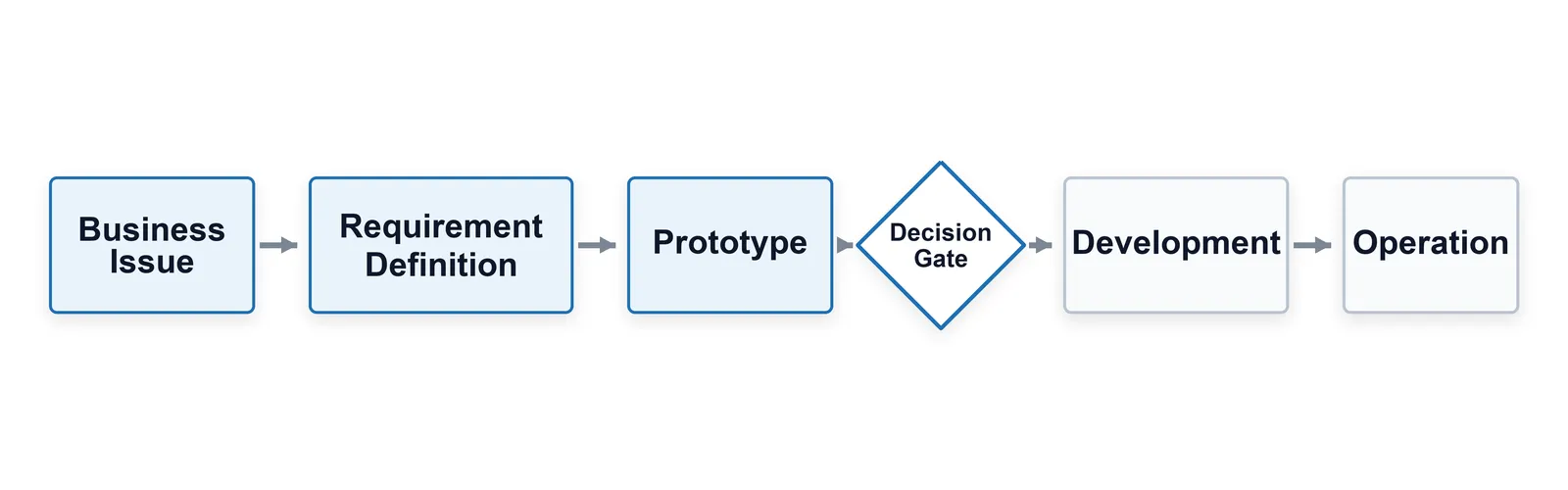
The diagram shows the flow: business analysis, requirements definition, prototyping, development, and operation.
Key is to confirm decision-makers, test results, and change terms before moving from prototype to development.
Initial Phase Scope
The initial phase should focus strictly on defining requirements.
This includes interviews, reviewing documents, scoping, system research, basic mockups, and estimating assumptions.
This differs from delivering a completed system.
Vague requirements lead vendors to submit inflated safe bids or low bids with later extra charges.
Clients also cannot compare proposals effectively.
Comparing a full-service bid with an implementation-only bid makes the total cost comparison meaningless.
What Not to Decide in the First Order
Do not try to finalize every feature in the first order.
Rushing a detailed feature list early often results in unused specifications.
Instead, define what remains undecided and when those decisions must be made.
Approval flows, integrations, permissions, reports, migration, and maintenance are high-impact areas.
These can remain "undecided" initially.
However, document these undecided items with set decision dates and owners.
Related articles

As AI coding agents rise, system development estimates are harder to judge by man-months alone. This article explains how clients should interpret the man-month model and verify AI scope, review duties, change management, and knowledge transfer before signing contracts.
Initial contract terms
Before choosing a contract type, both parties must define what constitutes a deliverable versus a process.
If requirements are vague, expecting a finished product leads to unclear acceptance criteria.
Conversely, relying solely on task support can prevent the client from managing deliverables.
Quasi-Delegation vs. Contract for Work
A Contract for Work is ideal when deliverables and acceptance criteria are clear.
It works best when screens, functions, reports, integration specs, and acceptance terms are defined.
However, if requirements change, fixed deliverables will require frequent contract renegotiations.
Quasi-delegation is better for research, requirements definition, prototyping, and ongoing improvement.
IPA guidelines also recommend different contracting approaches for each development phase.
Yet, quasi-delegation is not a cure-all.
Without defining scope, reporting, deliverables, reviews, and decisions, time will simply run out.
Pre-Contract Checklist
Before signing, verify at least the following items:
The primary goal: requirements definition, prototyping, or main development.
The deliverables: spec documents, UI drafts, validation reports, working prototypes, or coded features.
Acceptance criteria: document submission, review completion, smoke tests, or business approval.
Change management: handled by extra fees, timeline extension, or deferring to the next phase.
Key roles: who makes the business decisions and who verifies technical choices.
Skipping these checks leaves the client unsure of what they actually purchased.
For vague projects, starting with a small contract to define the next phase is much safer.
Related articles
Simply building AI or business systems to specs often fails to deliver results today. This article contrasts FDE with SES, contract development, and consulting, explaining from a client's perspective how Japanese firms can successfully adopt an FDE-style model.
Verify with prototype
A prototype is not a mini-final product.
It's a tool to find unclear requirements early.
While a working screen looks nearly complete, rules, data, permissions, and operations still need verification.
Business Logic Over Aesthetics
Focus on business decisions, not UI design preferences.
Who decides input fields?
What if the approver is away?
Is imported data accurate?
Can we handle exceptions manually?
Skipping these questions leads to massive rework later.
With multiple departments, the review order matters.
Relying only on the loudest department's feedback causes issues later.
Clients must define reviewers and decision-makers beforehand.
Conditions to Start Main Development
A working screen is not enough to start main development.
You must confirm scope, key data, permissions, integrations, non-functional requirements, operations, and support.
Only then can you compare development estimates accurately.
AI can generate prototypes faster.
While convenient, this doesn't speed up human decisions.
Too many unchecked screens lead to backlog specifications.
With AI, it is even more critical to define clear decision gates.
Related articles
Many companies build AI agent PoCs but struggle to move to production due to workflows, data permissions, approvals, audits, and liability. This article explains why PoCs stall and outlines key operational designs needed before launch.
Vendor info
Clients don't need detailed specs at first.
However, saying "just make it good" forces vendors to guess.
For vague projects, current workflows and constraints are crucial.
Minimum Required Materials
Having these documents initially helps streamline the process.
Document | Purpose | Alternative if Missing |
|---|---|---|
Current workflow | Understand steps and exceptions | Staff interviews |
User list | Determine permissions and screens | Department/role list |
Current data | Check input fields and integration | Excel/CSV samples |
Existing system info | Check APIs, auth, and migration | Admin screen screenshots |
Approval routes | Clarify decision-makers | List of meetings/approvers |
Outdated docs are fine.
They help identify what has changed.
If nothing exists, include workflow inventory in the project scope before defining requirements.
Decisions You Must Make
Delegate implementation, tech research, UI drafts, and workflow support.
However, you must decide business priorities, exception handling, required approvers, and operational limits.
Vendors propose solutions
but cannot take business responsibility.
Delaying decisions forces vendors to over-engineer or expect costly reworks.
Both options increase project costs.
Quote Comparison & Change Management
With fluid requirements, comparing quotes purely by price leads to poor decisions.
A $50,000 estimate varies wildly depending on whether it covers scope definition, prototyping, or full development.
Compare the underlying assumptions first, not the price.
Key Comparison Criteria
When comparing multiple vendors, evaluate these items alongside the estimate:
Criteria | What to Check | Risk If Missed |
|---|---|---|
Scope | Is it definition, prototype, or final build? | Cannot compare total costs |
Unresolved Items | What issues remain undecided? | Unpredictable extra costs |
Client Tasks | Who handles documentation and reviews? | Unexpected internal workload |
Change Terms | How are scope changes handled? | Late-stage disputes |
Handover | What knowledge is transferred in-house? | Complete vendor lock-in |
Proposals with many gaps in these areas are risky, even if cheap.
Conversely, a higher quote with clear assumptions and client duties is much easier to justify internally.
Setting Up Change Management
Scope change is not inherently bad.
For fluid projects, expecting change is normal.
However, without clear rules, every new request will turn into a costly add-on.
Define what triggers a paid change order, what gets postponed, and what can be swapped within scope.
For example, text tweaks are in-scope, adding fields requires impact assessment, and new integrations need a separate quote.
Avoid overcomplicating rules, but some baseline is needed to prevent late-stage project fatigue.
AI can now easily draft changes and impact reports.
However, the client must still make the final call.
Failing to log these decisions makes future project audits impossible.
Related articles

More firms outsource to fix IT labor shortages, but relying solely on it often hurts speed and quality. This article explains the pitfalls of outsourcing and how to balance in-house and external development.
Common Mistakes
Common failures in outsourcing vague requirements are trying to decide everything beforehand, or starting to build with nothing decided.
Both are extreme.
The former delays consultations; the latter causes disputes later.
Perfecting Specifications
Trying to write perfect specs internally can take months just gathering requests.
Meanwhile, business needs change, rendering them obsolete.
Without considering tech limits, it will require rework after handing over to vendors.
Clients should prepare decision criteria, not complete specs.
Clarify business issues, users, current processes, constraints, and decision-makers so vendors can propose requirement steps.
Consulting with organized uncertainties is faster than waiting for perfect specs.
Building Too Soon
Conversely, starting to build prematurely is risky.
This may work for tiny internal tools, but causes massive rework for complex systems involving multiple departments, integrations, and compliance.
Working screens look like progress, but they will change drastically if business rules are undecided.
If prototyping, define what you are testing first.
Is it approval flows, input fields, or system integration?
Without a clear question, prototypes just become hasty implementations.
Decision-Makers Skipping Reviews
Letting staff define requirements and present them to decision-makers at the end often fails.
Decision-makers might reject it due to budget, risk, or operational load.
This is not a vendor issue, but a client-side review design flaw.
For vague projects, involve decision-makers early.
They do not need to attend every meeting.
However, failing to set approval milestones will derail the project later when assumptions shift.
Summary
Outsourcing development with unclear requirements is not a mistake.
Complex business tasks with many stakeholders and integrations make detailed specifications hard to define upfront.
The key is treating vague areas as part of the initial scope rather than ignoring them.
Success requires separating business goals from system specs, limiting initial contracts to prototyping or scope definition, and logging all changes.
Contract type is decided later.
Vague deliverables or terms lead to hidden internal costs later, especially with cheap estimates.
Companies with strong internal teams utilize vendors efficiently.
If you lack internal PMs, business analysts, or technical leads, consider outsourcing the scope definition itself.
Phinx supports everything from scope definition and AI development to setting up offshore teams.
Our strength lies in converting vague requirements into actionable scopes before coding begins.
Sources
IPA Requirement Definition Guide 2nd Ed. https://www.ipa.go.jp/archive/publish/tn20191220.html
IPA Information System Model Contract https://www.ipa.go.jp/digital/model/index.html
IPA Model Contract (Agile Edition) https://www.ipa.go.jp/digital/model/agile20200331.html
IPA DX Trend Report 2025 https://www.ipa.go.jp/digital/chousa/dx-trend/tbl5kb0000001mn2-att/dx-trend-2025.pdf

Latest Articles

Stay up-to-date
Related articles
How to Outsource Development with Unclear Requirements: Scope & Contracts

Retaining Indian Talent 2026: Turnover Prevention & Year 1 Guide

Why AI Agent PoCs Fail and Enterprise Design Essentials

Is FDE Viable for Japanese Firms? SES Differences & Setup